





Getting a document notarized used to mean rearranging your entire day — finding a local notary, driving across town, and hoping your schedule lined up with theirs. An online notary eliminates all of that. You connect via video, verify your identity, sign digitally, and receive a legally notarized document without leaving your desk.
This guide covers exactly what online notarization is, how it works, what it costs, and how to get your document notarized today.

What Is an Online Notary?
An online notary — also called a remote online notary or RON — is a commissioned notary public who performs notarizations entirely over the internet using audio-video technology. Instead of meeting in person, you and the notary connect through a secure video call. You present your ID digitally, sign your document electronically, and the notary applies a tamper-evident digital seal.
The term electronic notary (or e-notary) is sometimes used interchangeably, though there's a technical difference. An e-notary may notarize documents electronically but still meet signers in person. A remote online notary does everything remotely, with no physical meeting required.
Key Insight: An online notary session isn't just a video call with a signature — it's a fully documented, legally defensible process with identity verification, an encrypted audit trail, and a tamper-evident digital certificate attached to your document.
How Does Online Notarization Work?
The process is more structured than a simple video chat. Platforms that offer online notary services follow a specific identity verification protocol before any signing takes place.
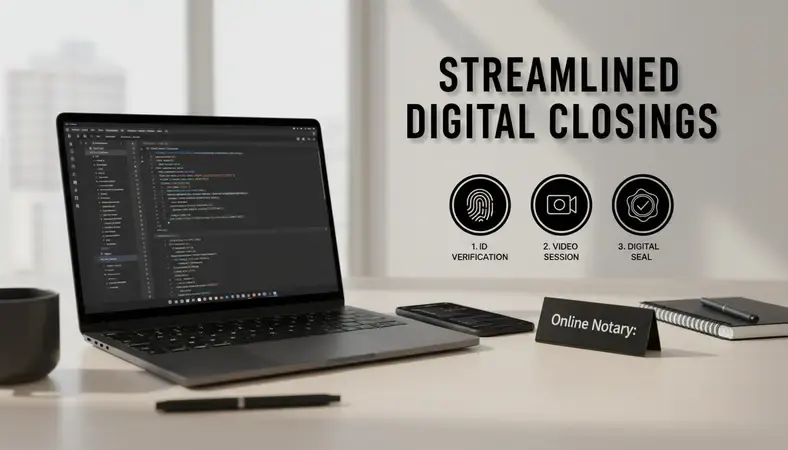
Here's what a typical session looks like from start to finish:
-
Upload your document: You log into the platform, create an account, and upload the document that needs notarization. Most platforms accept PDFs.
-
Verify your identity: This is the critical step. You'll go through two layers of verification:
- Credential analysis — you photograph your government-issued ID, and the system checks its security features automatically.
- Knowledge-Based Authentication (KBA) — the platform asks you questions drawn from your personal records (past addresses, loan history, etc.) that only you would know.
-
Connect with a notary: Once verified, you join a live video session with a commissioned online notary. They confirm your identity, review the document, and witness your electronic signature in real time.
-
Sign and seal: You apply your electronic signature. The notary applies their digital seal and certificate, which cryptographically locks the document. Any alteration after this point is detectable.
-
Receive your document: The completed, notarized document is available for immediate download. An audit trail — including the video recording and identity verification logs — is stored securely.
The entire process typically takes 15 to 20 minutes, compared to the hours a traditional in-person appointment can consume.
Is Online Notarization Legal?
The answer is yes — in most of the United States. As of 2024, over 40 states have enacted laws specifically authorizing remote online notarization. Several more states accept RON documents notarized in other states under interstate recognition principles established in the U.S. Constitution.
Each state sets its own rules about which documents qualify, what technology standards apply, and how notaries must be commissioned. States like Virginia, Texas, Florida, and Michigan were early adopters with well-established RON frameworks.
A small number of states still require in-person notarization for certain document types — particularly some real estate transactions. If you're unsure whether online notarization is valid for your specific document in your state, check your state's notary commission website or ask the platform you're using.
For documents that cross state lines, the general rule is that a notarization valid in the state where it was performed is recognized in other states. This makes online notary services especially useful for multi-state real estate deals, business agreements, and estate planning documents.
Online Notary vs. Traditional Notary
Understanding the difference helps you choose the right option for your situation.
Side-by-Side Comparison
| Feature | Online Notary | Traditional Notary |
|---|---|---|
| Location required | None — fully remote | Must be physically present |
| Availability | Often 24/7 | Business hours, by appointment |
| Identity verification | KBA + credential analysis | Physical ID inspection |
| Document format | Electronic (PDF) | Paper or electronic |
| Turnaround time | Minutes | Hours to days |
| Audit trail | Full video + digital log | Notary journal only |
| Cost | Flat fee per session | Varies by location |
| State acceptance | 40+ states | All 50 states |
Traditional notarization still makes sense when a document specifically requires wet ink signatures, when the receiving institution won't accept electronic documents, or when your state hasn't yet enacted RON legislation. For the vast majority of everyday documents, however, an online notary is faster, more convenient, and equally valid.
What Documents Can Be Notarized Online?
Most common legal and financial documents can be handled through an online notary. The list is broader than most people expect.
- Estate planning documents — wills (where permitted), living trusts, powers of attorney, healthcare directives
- Real estate documents — deeds, refinance paperwork, closing documents (in states with RON-enabled closings)
- Business documents — operating agreements, articles of incorporation, partnership agreements, contracts
- Financial documents — loan agreements, promissory notes, affidavits
- Personal legal documents — name change affidavits, vehicle title transfers, immigration documents
Some documents are excluded from online notarization regardless of state law. These typically include certain adoption papers, some court filings, and documents where the receiving party — like a specific bank or government agency — requires an original wet signature. Always confirm with the receiving institution before proceeding.
For context: if you've dealt with document notarization after car accidents for insurance claims or legal proceedings, those affidavits and sworn statements are commonly handled through online notary platforms today.

How Much Does Online Notarization Cost?
Online notary fees are typically a flat rate per notarization, set either by state law or by the platform. Most sessions fall in a predictable range — contact the platform for a personalized quote based on your document type and state requirements.
Compared to traditional notarization, online notary services often cost less when you factor in travel time, parking, and the opportunity cost of scheduling around someone else's hours. For businesses that regularly notarize documents, the time savings alone justify the switch.
Some platforms charge per document, others per session (which may include multiple signatures). BlueNotary offers transparent, session-based pricing with no hidden fees — visit bluenotary.us to see current rates.
How to Get a Document Notarized Online
The process is straightforward. Here's exactly what to do:
-
Prepare your document: Have your PDF ready before you start. If you only have a paper document, scan it first. Make sure it's complete — don't leave signature lines blank yet.
-
Choose a platform: Use a platform that's authorized in your state and compliant with state RON laws. BlueNotary is a good option for U.S.-based individuals and businesses, offering fast sessions with legally compliant notaries.
-
Create an account and upload: Register on the platform, then upload your document. Review it once more to confirm everything is correct.
-
Complete identity verification: Follow the prompts for credential analysis and KBA. Have your government-issued ID ready — driver's license or passport works for most platforms.
-
Join the video session: Connect with your assigned online notary. They'll confirm your identity, walk through the document with you, and witness your signature.
-
Sign electronically: Apply your electronic signature where indicated. The notary will apply their digital seal immediately after.
-
Download your notarized document: The completed document is available right away. Save a copy for your records. The platform retains the audit trail.
The whole process — from account creation to download — typically takes under 30 minutes for a first-time user.
Common Questions About Online Notarization
Is an online notary as legally valid as an in-person notary?
Yes, in states that have enacted RON legislation. The legal framework for online notarization is built on the same principles as traditional notarization — a commissioned notary, identity verification, and a witnessed signature. The digital seal and audit trail actually provide more documentation than a traditional notary journal entry, not less.
Can I use an online notary if I'm outside the United States?
Some platforms do accommodate U.S. citizens abroad who need documents notarized under U.S. law. The notary must be commissioned in a U.S. state with RON authority. Requirements for international signers vary by platform, so confirm before booking a session.
What if my bank requires an in-person notary?
Some financial institutions — including certain branches that offer notary services like Bank of America with notary — have specific policies about accepting electronically notarized documents. Always check with your bank or the receiving institution before using an online notary for financial documents. Most major lenders have updated their policies to accept RON documents, but it's worth confirming.
Do I need special software or equipment?
No special software is required. You need a device with a working camera and microphone — a smartphone, tablet, or laptop works fine — plus a stable internet connection. The notary platform runs in your browser.
What happens if I fail identity verification?
If you don't pass KBA, you typically can't proceed with that session. This is a security feature, not a flaw. Contact the platform's support team — they can often help identify the issue. Common causes include recent address changes or credit file discrepancies.
Is becoming a notary public required to use online notary services?
No. Becoming a notary republic (notary public) is required only if you want to perform notarizations, not if you're a signer. If you need a document notarized, you simply use a platform like BlueNotary and connect with an already-commissioned notary.
What This Means for You
Online notarization removes the biggest friction point in document signing — scheduling around someone else's availability. If you have a document that needs a notary seal, you can handle it today, from wherever you are.
Notarize your document at BlueNotary — complete identity verification, connect with a live notary, and receive your legally sealed document in minutes, with no office visit required. Ready to get started? Visit BlueNotary to learn more.